 Syncgate

Run recurring reviews and checks
through to the result files
A harness is a work environment that combines instructions, data, a runtime and completion checks. The model reads the attached files and runs code in an isolated container to produce result files, and the completion checks recalculate those results to confirm them.

Chatbots, agents and harnesses
can do different work
The same AI can stop at an answer or take the work through to result files, depending on how it is used.
Chatbots
Answers questions, using files the user uploads and what the model already knows.
- Ask about policies and get answers
- Summarize, translate and draft documents
Agents
Searches company data and uses tools to answer with evidence.
- Searches internal policies and databases and answers with evidence
- Looks up and registers entries in company systems (approval before running)
- Long tasks handled by a connected harness
Harnesses
Reads files and calculates with code and libraries in an isolated work environment, produces result files and checks them itself.
- Compares a documentary credit and shipping documents condition by condition and marks the discrepancies Trade finance document examination
- Checks a full quarter of transactions against rules Anti-money laundering review
- Totals the quantities in equipment drawings and writes a material list Drawing review
- Recalculates the numbers in the results from the original data Completion checks
People who are good with AI
already work this way
They use code assistants in isolated work environments to do what ordinary chatbots cannot. But those methods stay on each person's PC.
Working with a code assistant
Code assistants (for example, Claude Code, Codex and OpenCode)→Run code and libraries in an isolated work environment
- Turns hard-to-read files such as drawings and lab data into data that AI can easily understand.
- Calculates and reconciles thousands of transactions and produces tables and documents.
- This is hard to do with an ordinary chatbot or agent.
But it stays a personal way of working
- Each person works separately on their own PC, so the team finds it hard to share the methods they build.
- It takes command-line and development skills, so few people can use it.
- Work easily ends up outside the company's security rules and logs.
SoSyncgate harnesses let the team use the same approach together, in an isolated work environment on company servers and without a command line.
Syncgate harnesses make that way of working
the organization's own
The isolated work environment sits on company servers, anyone can use it from chat, and a work method one person builds is shared by the team and the organization.
In chat, without a command line
- Select a harness in chat, attach files and send the request.
- The isolated work environment runs on company servers.
Hard-to-read files into easy-to-use data
- Reads equipment drawings and pharma and biotech lab files with code, and produces summaries, keywords and filter values for search.
- Start from the Data extraction template, and the knowledge base searches with those values.
Work a chatbot cannot do
- Uses libraries to check every record, compare documents and calculate statistics.
- Returns the results as Excel files, Hangul (HWPX) documents or image files.
Results checked again
- Before handing the results over, it recalculates the numbers from the original data.
- If the results fail the check, it redoes the work, and if they do not pass within the set number of attempts, it delivers them with a note saying so.
Shared by teams and the organization
- Share the harnesses you build with teams or the organization, with Use, Read or Edit permission.
- With share review turned on, only approved versions apply to everyone.
What a harness includes
- Work procedures (instructions), work tools (skills), connections to company data and rules for checking results (completion checks)
- Copy one of the 17 harness templates and adapt it.
DevelopersInstall the same harness in developers' coding tools (Claude Code, Codex and others) and use it with the same procedure.
Run each domain's work procedures
in a harness
A harness bundles instructions, skills, libraries and completion checks into one work environment. The model reads the attached files and runs code in an isolated container to produce result files, and the completion checks recompute those results.
Check the documents against the credit terms, mark the discrepancies and screen the sanctions list.
A sample screen. Real steps and times depend on the model and the files.
Trade finance document examination
Copy the template and connect the examination guidelines and sanctions list. Attach the documentary credit message and 5 shipping documents in chat, and you get back the sanctions list matches, 4 discrepancies and a marked-up invoice. Send one corrected invoice, and only that condition is examined again.
Sales call review
Copy the template and connect the contract database and sales guidelines. Upload telephone sales recordings in chat, and the harness transcribes all of them, checks each call for required explanations, forbidden expressions and speech rate, and returns the risky calls ranked by score. Add transcripts, and 3 calls are checked again.
Anti-money laundering review
Copy the template and connect the core banking database and operating guidelines. Upload the transaction history in chat, and you get back the sanctions list matches, the transactions each rule flagged, a fund flow chart and a draft suspicious transaction report. Attach remittance messages in the same conversation, and each message is checked one by one.
Risk management
Copy the template and connect the risk database. Upload one development sample in chat, and you get back a metrics table and charts with discrimination and stability recalculated over all 3,000 borrowers in the database, plus a draft validation report. Then upload a flood hazard map and the collateral list to get loan balances by risk grade and an exposure map.
Credit review and monitoring
Copy the template and connect the credit database and internal credit rules. Upload 4 financial statements in different formats, and you get back 10 warnings found with the same criteria, a distribution chart and a one-page summary for each company. From one property registry certificate, it calculates the total senior claims and the available lending limit.
Cell image quantification
Put the analysis SOP in the instructions and upload 8 microscopy images, and you get back nucleus outline images, a group comparison chart and a results table. Follow-up analysis continues in the same working folder.
Drawing review
Copy the template, connect the material master and design standards as resources, then attach a DXF drawing in chat to get back a marked-up drawing and a bill of materials.
Before and after adoption
Each reviewer checks in a different way, so the same data gives different results.
Set instructions and completion checks on a harness, and every check follows the same procedure, whoever makes the request.
Someone has to recalculate the numbers in an AI answer to see whether they are right.
Completion checks recalculate the totals and counts in the result files and compare them, and the work is redone if they do not match. If the checks do not pass within the set number of attempts, the harness delivers the results and says so.
Some work has been checked only by sampling because there is so much of it.
Even high-volume data such as transaction histories or journal entries is checked in full, with the same rules.
Four steps
Copy a template that contains a domain's instructions, skills and completion checks. Connect your company's instructions and databases to match the resources the template recommends.
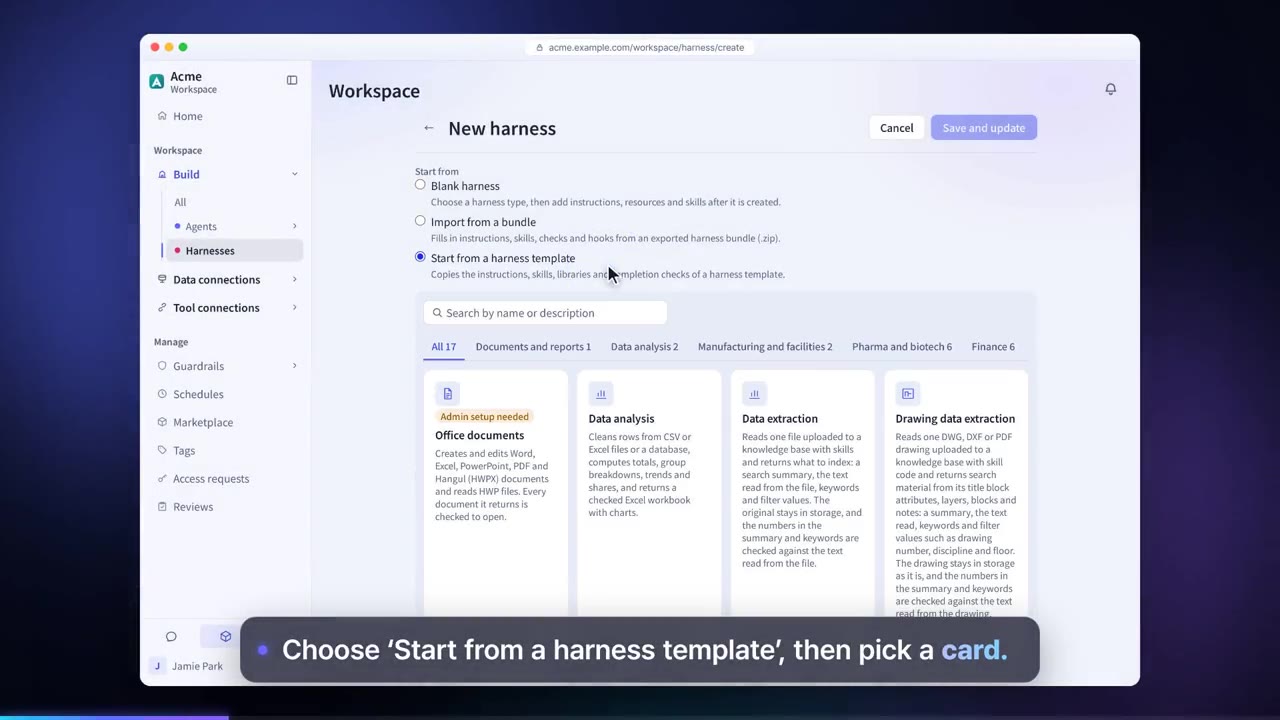
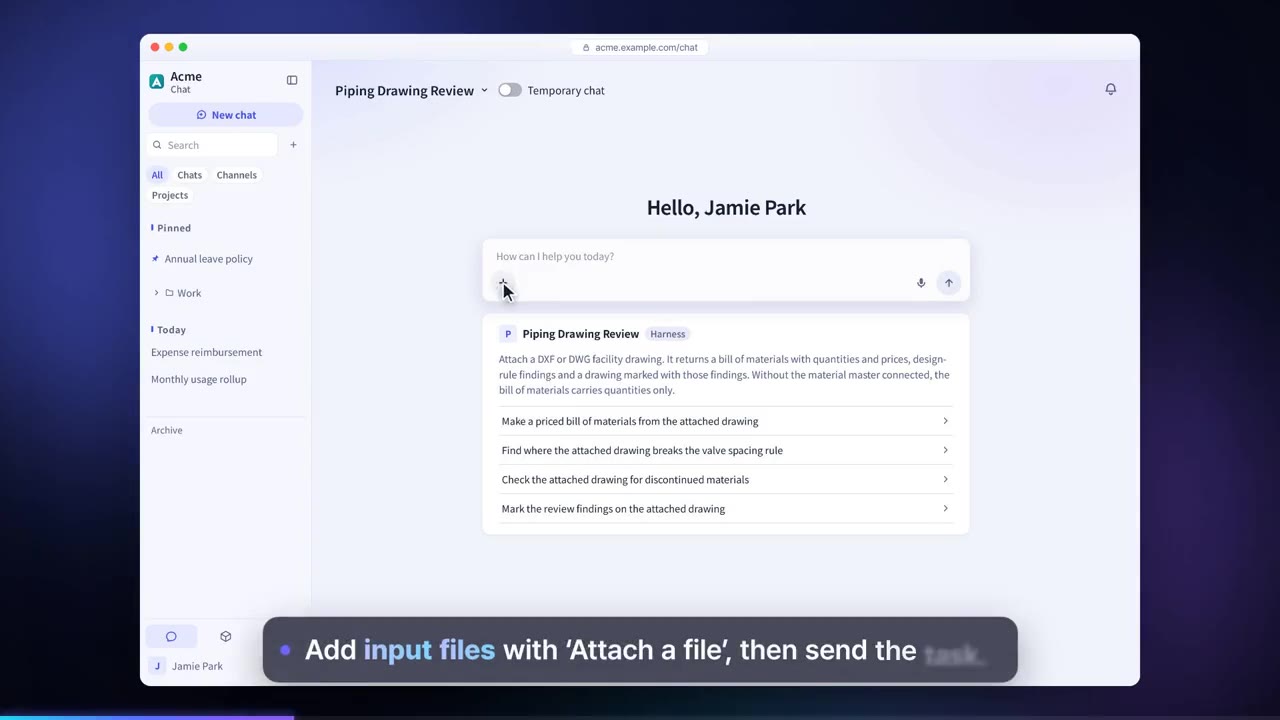
Select a harness in chat, attach files and send the request. A harness also runs from agents connected to it and from those agents' scheduled tasks, and it can be installed in coding tools such as Claude Code and Codex.
The model reads the files and runs code inside the harness's container to produce result files.
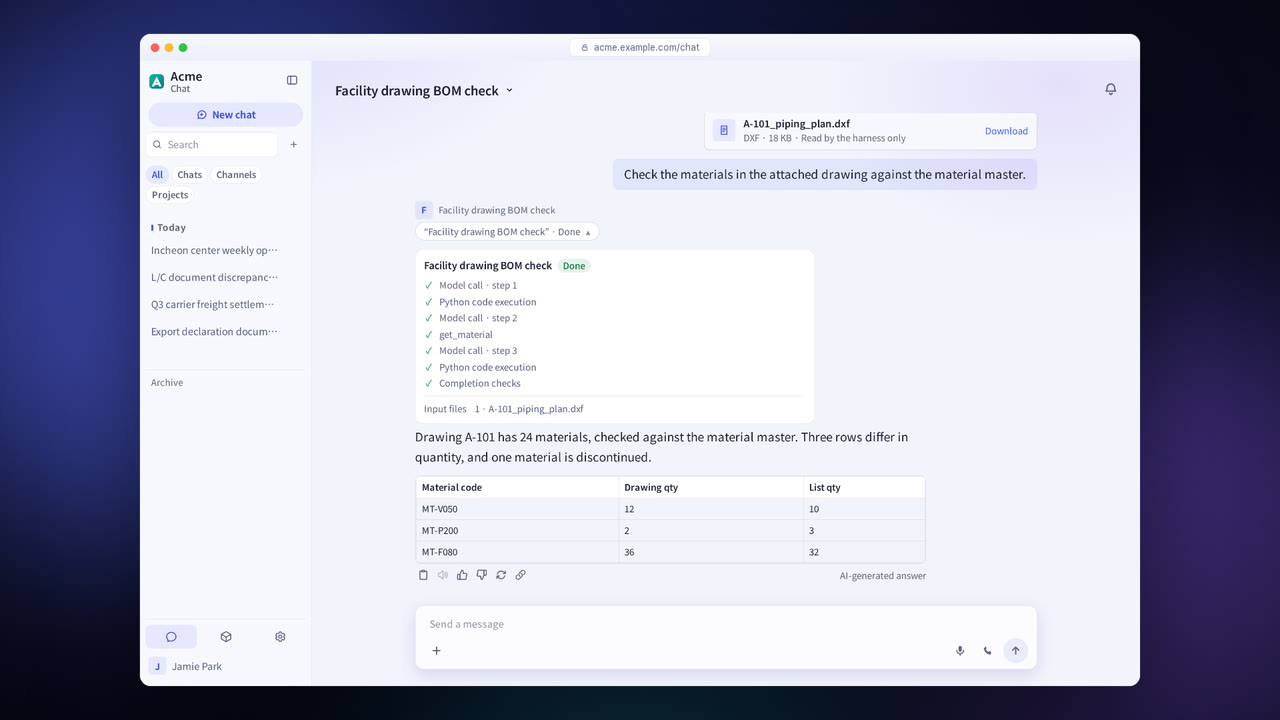
A check script recalculates the results to confirm them, and the work is redone if they do not pass. If they do not pass within the set number of attempts, the harness says so and attaches the result files. Send the next message with a request, and the work continues in the same working folder.
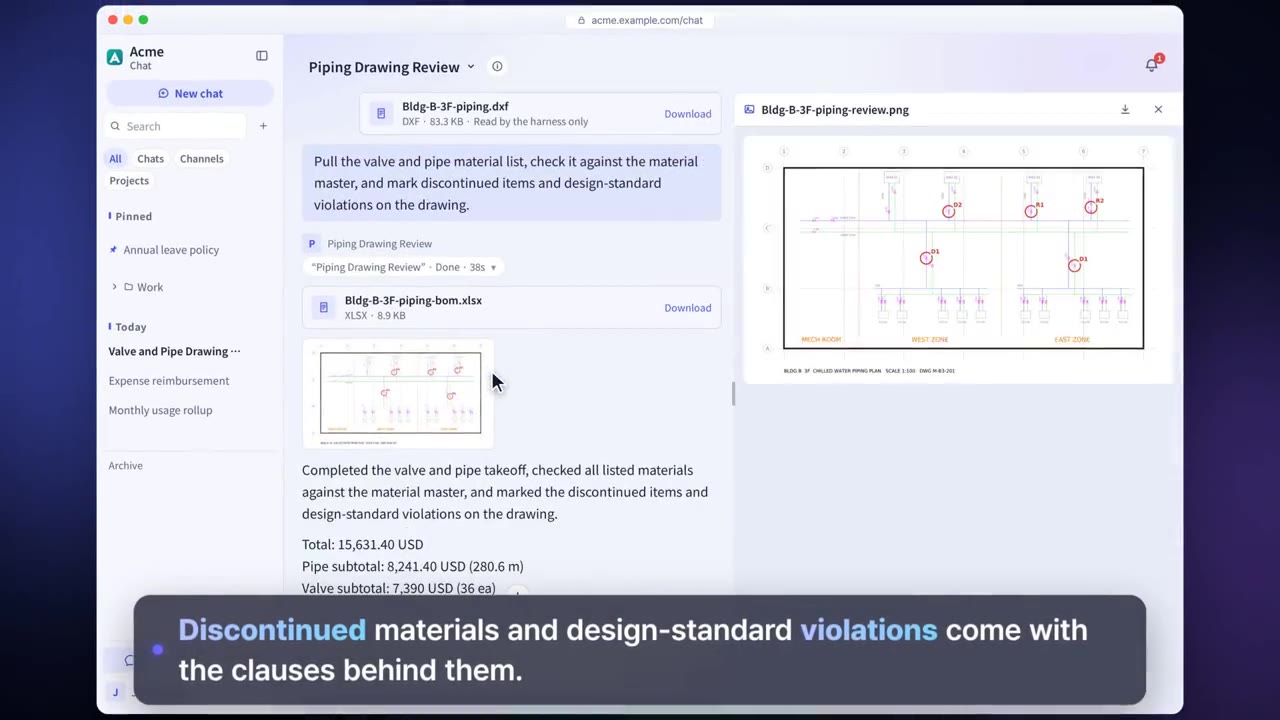
Harness features in detail
17 harness templates
Copy a template containing the work procedures for financial services, pharma, biotech, manufacturing, data analysis or document work, and start right away.
Instructions
The steps and decision criteria the model in the harness reads first each time it is called. Imported and exported as an AGENTS.md file.
Resource connections
Connect knowledge bases, databases, tool connections and skills, and decide for each tool whether it runs without approval.
Runtime
Set the model that does the work and the limits per call, and add Python and npm libraries after an install check.
Completion checks and hooks
Check scripts recalculate the values in the result files. Set the number of retries, the evaluation model and the output format.
Result files
Get results as Excel, Word, PowerPoint, Hangul (HWPX) or PNG files.
Continuing work
After an answer, send the next message with a request, and the harness continues the work, keeping the earlier conversation and the working folder.
Bundle export and import
Export a harness as a bundle file, then import it into another installation to recreate the same configuration.
Session management
Check the size of the working folder, and end the session if needed.
Settings each company configures
- Register harness execution servers and connect them to harness types.
- Activate the domains you will use in the Marketplace. Some domains include templates that require a separate purchase.
- Turn on the harness to use for knowledge base data extraction.
- Set the sharing scope and the Use, Read and Edit permissions for each harness.
Figures reflect the product as of October 2026.
Frequently asked questions about harnesses
How is a harness different from an agent?
An agent is a work assistant that answers in conversation and calls tools. A harness is a work environment that takes files, runs code and produces result files, and it checks the results with completion checks. You can also connect a harness to an agent to run long tasks.
Do templates have to be used as they are?
No. After copying a template, adapt its instructions, skills and completion checks to your company. Connect your company's instructions and databases under “Resource connections.”
Can the results be trusted as they are?
The results are a draft, and the person in charge makes the final decision. Completion checks recalculate the numbers in the result files and check their format, to confirm that the answer and the files agree.
Where are files processed?
They are processed in an isolated container on a server your company installed. Model calls go only to models that the administrator has connected and allowed.
See it with
your own documents
In a consultation, we connect a few of your documents so you can check the answer quality for yourself. Send us your questions and our team will get back to you.